
Create, translate and publish content
Overview
Use this page to understand how content translation works in AWF.
You will learn:
- how to create new multilingual content
- how to update existing content
- when to keep synchronization
- when to break synchronization with a clone workflow
- how scheduled publication works
⚠️Important: In a translation workflow, you can only work from the latest published version of the source language.
Quick decision guide
Which workflow should I use?
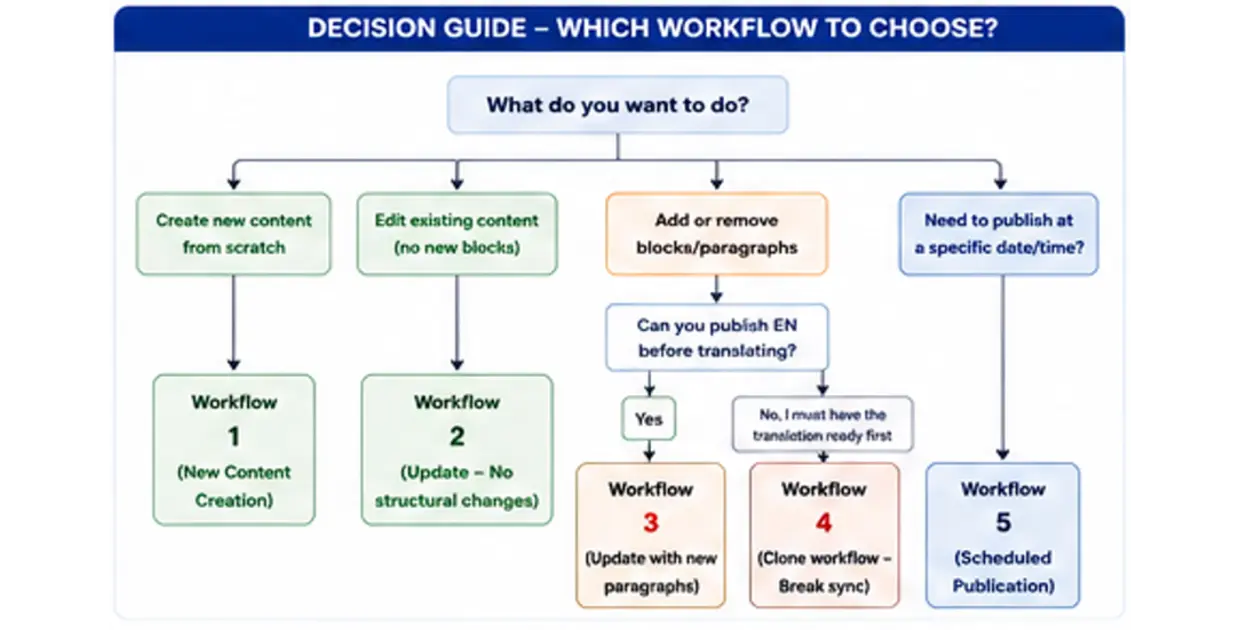
Choose the right workflow based on what you need to do.
Workflow 1 for new content creation
Workflow 2 for text or image updates without structural changes
Workflow 3 when adding or removing blocks or paragraphs
Workflow 4 to break synchronization and work independently
Workflow 5 for scheduled publication
Follow the decision tree below to identify the best workflow for your situation.
Choose your workflow based on the type of change you need to make:
- Create new content from scratch
- Edit existing content without changing the page structure
- Add or remove blocks or paragraphs
- Publish content at a specific date and time
| Workflow | Add / Remove blocks ? | Can translate while EN is Draft ? | Need to publish or schedule EN first ? | Synchronization with source ? |
|---|---|---|---|---|
| 1. New Content Creation | ✅ | ✅ | ❌ | ✅ |
| 2. Update (No structural changes) | ❌ | ❌ | ✅ REQUIRED | ✅ |
| 3. Update (New paragraphs) Standard path | ✅ | ❌ | ✅ REQUIRED | ✅ |
| 4. Clone workflow (Break synchronization) | ✅ | ✅ | ❌ | ❌ (Independent) |
| 5. Scheduled Publication | Depends on chosen workflow | Follows the rules of the selected workflow | Yes for 2 & 3 (EN first) | Depends on workflow |
Workflow 1
New Content Creation
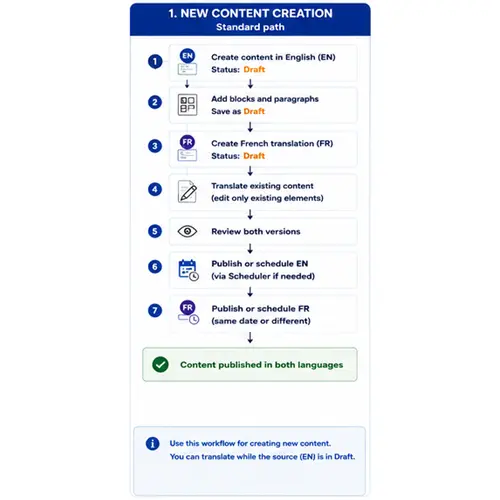
Use this workflow when you create a page in the source language and then create its translation.
Typical steps:
- Create the content in English.
- Add blocks and paragraphs.
- Create the French translation.
- Translate the content.
- Review both versions.
- Publish immediately or schedule publication.
Result: The content is available in both languages.
💡You can translate while the source content is still in Draft.
Workflow 2
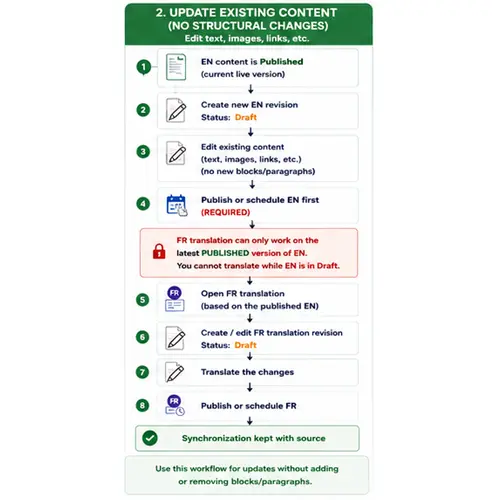
Update Existing Content Without Structural Changes
Use this workflow for text, image, link, or metadata updates when you are not changing the page structure.
Typical steps:
- Open the published English content.
- Create a new English revision.
- Update the existing content.
- Publish or schedule the English version first.
- Open the French translation.
- Create a French revision.
- Translate the changes.
- Publish or schedule the French version.
Result: Synchronization with the source is preserved.
💡Translation can only work on the latest published English version. You cannot translate from an English Draft.
Workflow 3
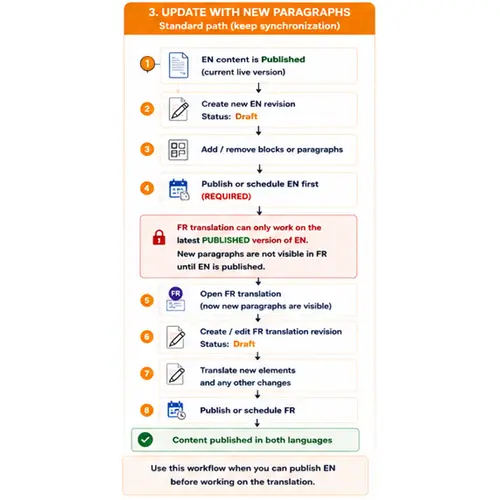
Update with New Paragraphs or Blocks
Use this workflow when the page structure changes and new blocks or paragraphs are added.
Typical steps:
- Open the published English content.
- Create a new English revision.
- Add new blocks or paragraphs.
- Publish or schedule the English version first.
- Open the French translation.
- Create a French revision.
- Translate the new elements and other changes.
- Publish or schedule the French version.
Result: The content is published in both languages with the new structure.
💡New paragraphs are not visible in the translation until the English version is published.
Workflow 4
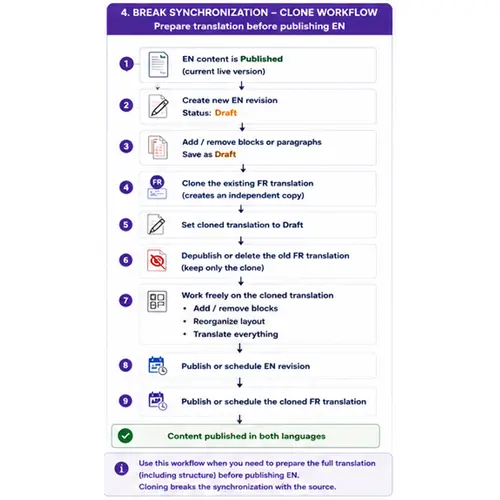
Break Synchronization with Clone Workflow
Use this workflow when the translation must evolve independently from the source.
Typical steps:
- Open the published English content.
- Create a new English revision.
- Add new blocks or paragraphs if needed.
- Clone the existing translation.
- Set the cloned translation to Draft.
- Depublish or delete the old translation.
- Rework the cloned translation independently.
- Publish the English version.
- Publish the cloned translation.
Result: Both languages are published, but the translation is now independent from the source.
💡Cloning breaks synchronization with the source. Use this only when you need translation-specific structure.
Workflow 5
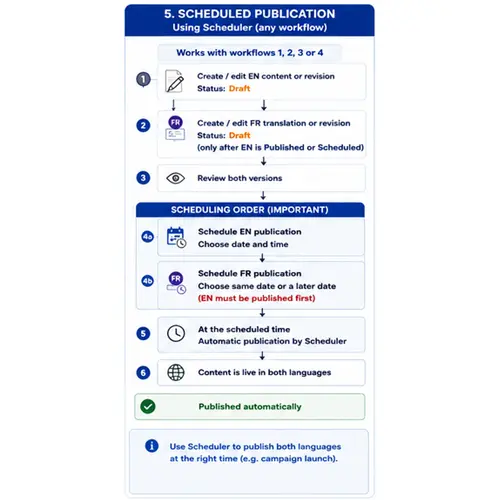
Scheduled Publication
Use this workflow when content must go live automatically at a specific date and time.
Typical steps:
- Create or edit the English content or revision.
- Create or edit the French translation or revision.
- Review both versions.
- Schedule English publication.
- Schedule French publication.
- Wait for automatic publication at the scheduled time.
Result: Both language versions go live automatically.
💡French must be published first or at the same time depending on the workflow rules shown in the diagram.
What you must know before you start
Key Rules & Limitations
Follow these rules to avoid errors
🚫 Never delete the source language
⚠️ You can only translate based on the last PUBLISHED version of the source language
🔒In translations, you cannot add or remove blocks/paragraphs while synchronized with a non-published EN revision
ℹ️ Cloning or deleting a translation only affects the translation, not the source