

To access your back office follow this process.
Carefully follow these steps. You have to define a site and a profile.
- Begin by accessing the Alto Web Factory on AM Store.
- Click on "Request".
- Ignore "Right". Do not select any item from the droplist.
- Indicate the reason for your request for rights in the justification field.
- Your name will be added directly to the list of "beneficiaries", and you can also add other people or even a department.
- Activate the checkbox "Advanced form".
- Among the list, find the site you want to access and activate the "Prod" and "Preprod" checkboxes.
- Scroll down and enable the desired role for "PROD" and "PREPROD". Choose between Global Manager, Manager, and Reader.
- Click save button.
- Following validation, you must wait for your manager and IT to accept your request.
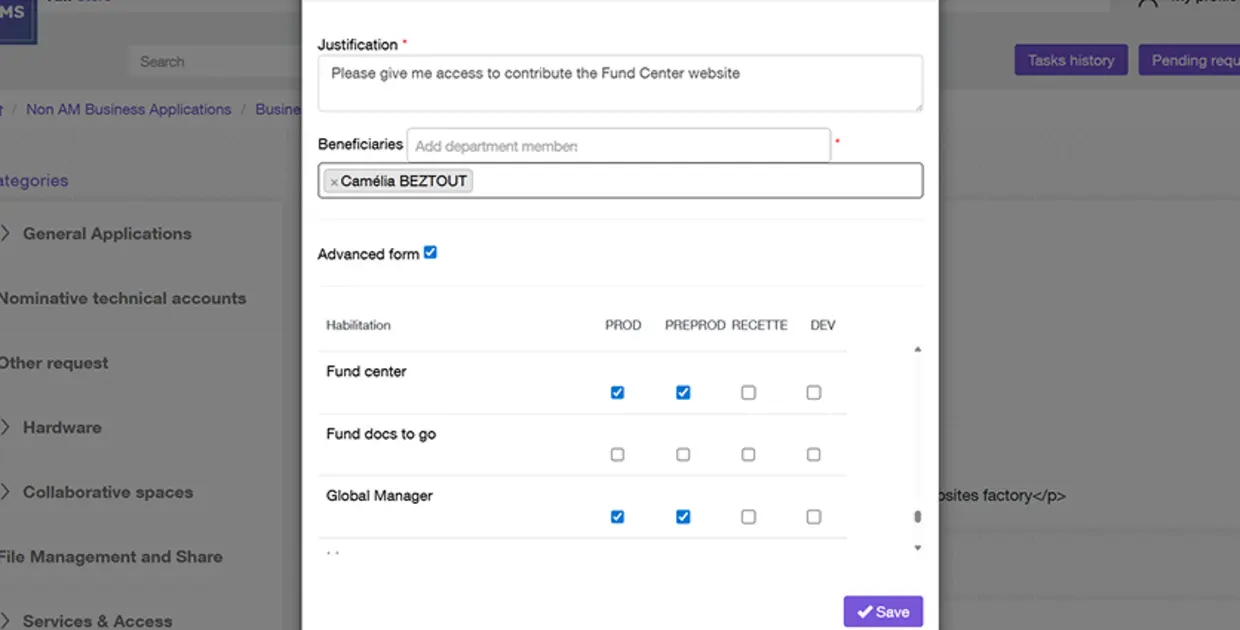
Here is an example to request access to the "Fund Center" site on the "PROD" and "PREPROD" environments as "Global Manager".